Do I Really Need a DGX Spark? Running Local AI for AppSec on a Base M5 MacBook Pro with 32GB

Update, 9 Oct 2026: I’ve now tested a real DGX Spark, thanks to Nicholaas Havenga. The measured results replace my estimates; see “DGX Spark: measured” below.
Why I tested local models
A base M5 MacBook Pro with 32GB of memory ran Qwen3.6 35B at 45–57 tokens per second, fully on the GPU. For building and testing my AI-native security pipeline, that is enough. I did not need a DGX Spark.
Some context. In my last post I described the pipeline I am building for Stokum.Net. Semgrep, Trivy, Checkov and ZAP handle detection in Gitea Actions. One AI agent triages the findings, writes threat notes and reviews every PR.
Everything runs on hardware I control, except one piece: the agent still calls an external LLM API. Security tooling reads your most sensitive code, so the next question was obvious. Can the reasoning layer run locally too?
This post covers what I tested, what I measured, and what went wrong along the way. That includes an overheating server that silently corrupted 20GB downloads.
Test setup
I tested two machines, with the same two models and the same prompts.
Machine | CPU / GPU | Memory | Bandwidth | OS / runtime |
|---|---|---|---|---|
M5 MacBook Pro (base) | 10-core CPU, 10-core GPU, 16-core Neural Engine | 32GB unified | ~153 GB/s | macOS, Ollama 0.34.4 (Metal) |
An old computer | 6-core Intel CPU, AMD Radeon Pro 580X 8GB | 72GB RAM + 8GB VRAM | ~40 GB/s | Ubuntu 26.04 LTS Server, Ollama 0.35.0 (Vulkan) |
The models:
- qwen3.6:35b — mixture-of-experts, 35B parameters, about 3B active per token, 4-bit, 22GB.
- qwen3.6:27b — dense, 27B parameters, all active per token, 4-bit, about 16GB of weights.
The method was simple. I ran ollama run <model> --verbose and asked the same short question twice: once with thinking off (/set nothink), once with thinking on (/set think). The speed is the eval rate from the verbose stats. ollama ps showed how each model split between CPU and GPU.
Two settings differed. The M5 used Ollama's default 32K context. The old computer used an 8K context, flash attention and a q8 KV cache. With prompts this short, that barely affects generation speed.
Results on the M5 MacBook Pro
Both models ran 100% on the GPU. The 35B generated 45–57 tokens per second; the 27B generated 13–16.
Model | GPU share | Speed, thinking off | Speed, thinking on | Thinking answer, total time |
|---|---|---|---|---|
qwen3.6:35b | 100% | 45.3–45.7 tok/s | 50.8–57.4 tok/s | 6.8–7.9 s |
qwen3.6:27b | 100% | 16.3 tok/s | 13.2 tok/s | 24.8 s |
The short answers were only a few dozen tokens, so rates vary run to run. Across repeated runs the 35B stayed within about 10%.
Thinking mode is the real cost. For a simple greeting, the models wrote 315–368 hidden reasoning tokens before a one-line answer. That is worth it for code review and threat notes, not for quick questions.
I also tried Meta's Muse Glimmer 30B, another dense model. It ran at 7.6 tokens per second, about half the speed of Qwen3.6 27B on the same machine.
Update: MLX made it faster
After the post went live, Michael Vergoz suggested trying Apple's MLX framework instead of Ollama. Same M5, same model (Qwen3.6 35B-A3B, 4-bit), thinking on:
| Engine | Generation speed | Peak memory |
|---|---|---|
| Ollama (GGUF) | 51–57 tok/s | ~22GB |
| MLX | 52–57 tok/s | 19.6–20.5GB |
| MLX + MTP drafter | 78–83 tok/s | 21.2GB |
Plain MLX matched Ollama, with about 2GB less memory. The gain came from multi-token prediction: a small drafter model guesses tokens ahead, and the main model verifies them in one pass. 86% of drafted tokens were accepted, so each step produced about 2.7 tokens instead of one.
Bandwidth still sets the ceiling; the runtime decides how close you get to it, and speculative decoding raises it. One caveat: a short greeting is close to the best case for drafting, so expect a smaller gain on real code reviews.
Why the bigger model is faster
Memory bandwidth sets the speed. To generate each token, the machine reads the model's active weights from memory.
The 35B is a mixture-of-experts model. It holds 35B parameters but uses only about 3B per token, so it reads little data per step. The 27B is dense and reads all 27B parameters every time.
That math predicts a ceiling for the 27B on the M5 of about 9.5 tokens per second (153 GB/s divided by 16GB). I measured 13–16. The most likely reason is speculative decoding: Ollama's build of this model predicts several tokens ahead and verifies them in one pass. Muse Glimmer gets no such boost in Ollama, which fits its lower 7.6 tokens per second.
Apple's unified memory is the other half of the story. On the M5, the CPU and GPU share one 32GB pool, and macOS lets the GPU use about two-thirds to three-quarters of it by default, roughly 21–24GB. So the whole 22GB model sat on the GPU.
That old computer's GPU has its own separate 8GB. Only a quarter of each model fit there; the rest ran on the CPU from system RAM, at about a quarter of the M5's bandwidth.
The rule of thumb: memory size decides which models you can run. Memory bandwidth decides how fast they run.
The old computer: more RAM, much slower
My old computer has 72GB of RAM, so both models load. It ran them 3.5–7 times slower than the M5.
Model | CPU / GPU split | Speed, thinking off | Speed, thinking on | Thinking answer, total time | Peak CPU temp |
|---|---|---|---|---|---|
qwen3.6:35b | 76% / 24% | 7.0 tok/s | 7.8 tok/s | 46.4 s | not recorded |
qwen3.6:27b | 73% / 27% | 4.7 tok/s | 3.8 tok/s | 1 min 42 s | 100°C |
qwen3.6:27b, Turbo Boost off | 73% / 27% | 3.9 tok/s | 3.3 tok/s | 1 min 44 s | 90°C |
The AMD GPU does help. ROCm does not support this older Polaris GPU, but Ollama's Vulkan backend does. Still, only about 5GB of each model fits in its memory. The other three quarters run on the CPU at about 40 GB/s, and that sets the pace.
The overheating saga
Getting these numbers took most of an evening. Every 20GB download failed with digest mismatch, even with a single download stream. A direct curl download failed the same way, so Ollama was not the cause.
The decisive test: I ran sha256sum on the same file three times and got three different results. The file had not changed. The machine was misreading it.
The cause was heat. Under Linux, the fan sat at its 1,200 RPM minimum while the CPU passed 87°C. Installing mbpfan fixed the fan control. The next download verified on the first try.
Lessons for anyone running Linux on repurposed hardware:
- Install
mbpfan, and tunelow_temp,high_tempandmax_tempso the fan ramps early. - Consumer RAM has no ECC, so the kernel logs nothing when data goes bad. A checksum test is the quick way to find out.
- Turning off Turbo Boost cost about 15% speed and bought about 10°C of headroom. For a home server, that trade is worth it.
DGX Spark: measured, and Jetson
When I first wrote this post, my DGX Spark numbers were estimates. Nicholaas Havenga then offered me time on his Spark, so I measured them for real, using the same prompt and the same models. His assistant Gwen, an AI agent running on his own hardware, set up both engines for me.
Single requests (tok/s, thinking on):
| Model | M5 (Ollama) | M5 (MLX + MTP) | Spark (Ollama) | Spark (vLLM + MTP) |
|---|---|---|---|---|
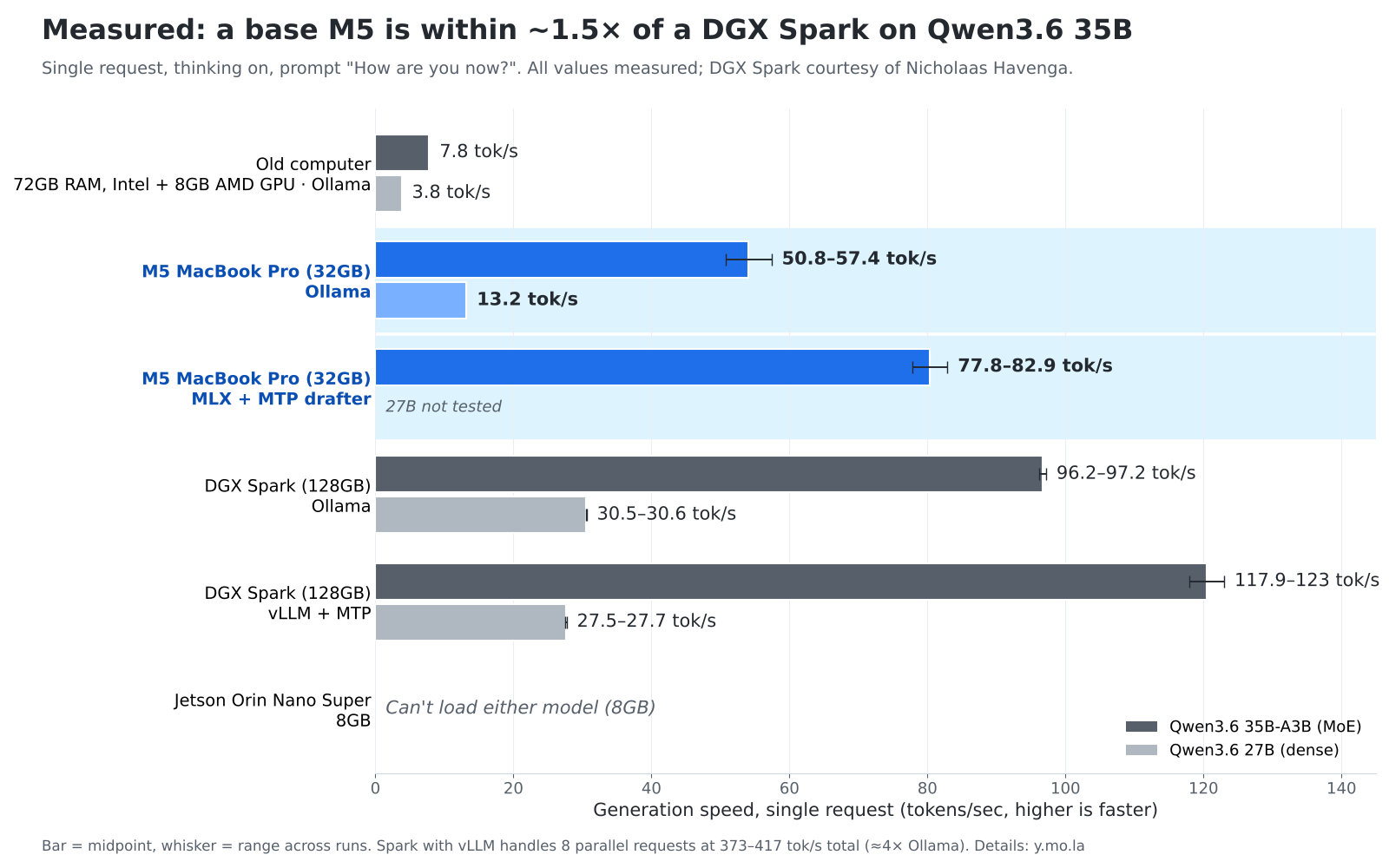
| Qwen3.6 35B-A3B | 51–57 | 78–83 | 96–97 | 118–123 |
| Qwen3.6 27B | 13.2 | — | 30.5 | 27.5–27.7 |
My bandwidth estimate for the 35B (80–100 tok/s) held up well. With the same engine, the Spark is about 1.8× faster than the M5. With the best engine on each, vLLM on the Spark versus MLX + MTP on the M5, the gap shrinks to about 1.5×. One surprise: for the dense 27B, vLLM was slightly slower than Ollama on the same Spark.
Parallel requests (Qwen3.6 35B, total tok/s):
| Parallel requests | Spark (Ollama) | Spark (vLLM) |
|---|---|---|
| 1 | ~97 | ~121 |
| 2 | ~89 | 163–169 |
| 4 | ~93 | 210–213 |
| 8 | ~95 | 373–417 |
This is where the Spark really pulls ahead. Ollama answered parallel requests one at a time, so its total stayed flat, and the eighth request waited over 30 seconds before it started. vLLM ran all eight together, each starting within about a second, for about 4× the total throughput. Each individual answer slows down (to about 64 tok/s), but the machine does far more work per second.
So the Spark’s advantage isn’t single-request speed on these models. It’s 128GB of memory for larger models, and serving many requests at once.
Test setup: Spark Ollama with Q4_K_M models (8 Oct); Spark vLLM 0.28.0 with NVIDIA’s NVFP4 builds, MTP with 2 speculative tokens, 32K context (9 Oct). Prompt “How are you now?”, measured through the API. Nicholaas’s own on-box runs matched closely, so the network didn’t affect generation speed.
The Jetson Orin Nano Super cannot run either model. It has 8GB of shared memory, which limits it to models of up to about 8B parameters at 4-bit. It is a strong board for robotics and edge AI, and it now costs $399 after a July 2026 price increase.
Update: Amit Singh, who runs a DGX Spark and an RTX 6000 with vLLM, shared real-world numbers. On a Mac Ultra with 256GB, he got about 36 tokens/sec across concurrent sessions; on the DGX with vLLM, over 120. For a single request, the Mac Ultra actually has more memory bandwidth than the Spark, so the gap comes from serving many requests at once. As he put it, raw speed was less of an issue than concurrent sessions. That matters for production, like parallel PR reviews, not for building and testing on one laptop.
Side by side
The M5 is 3.5–7 times faster than my 72GB machine. The DGX Spark adds about 1.8 times with the same engine, and up to 2.2 times with vLLM.
Old computer | M5 MacBook Pro | DGX Spark (estimate) | Jetson Orin Nano Super | |
|---|---|---|---|---|
Memory for models | 72GB RAM + 8GB GPU | 32GB unified | 128GB unified | 8GB shared |
Bandwidth | ~40 GB/s | ~153 GB/s | ~273 GB/s | ~102 GB/s |
35B: share on GPU | 24% | 100% | 100% | does not fit |
35B: thinking answer | 46.4 s | 7.9 s | ~4–5 s | does not fit |
27B: share on GPU | 27% | 100% | 100% | does not fit |
27B: thinking answer | 1 min 42 s | 24.8 s | ~13–14 s | does not fit |
Largest practical model | 70B loads, ~1 tok/s (est.) | 27B–35B | 120B class | ~8B (4-bit) |
What this means for the security pipeline
The M5 is enough to build and test the pipeline's reasoning layer locally. The plan is to split the work between the two models.
Pipeline job | Model | Why |
|---|---|---|
Triage and noise filtering on every PR | qwen3.6:35b | Fast enough to run on every push |
Threat notes and deeper code review | qwen3.6:27b | Stronger at coding: 77.2 vs 73.4 on SWE-bench Verified |
The SWE-bench scores are vendor-reported and come from two different sources: 77.2 for the 27B from Meta's comparison table on the Muse Glimmer model card, and 73.4 for the 35B from a side-by-side comparison page. No single source tests both Qwen models under the same setup, so treat the gap as approximate. My own review results will decide the final split.
One honest limit: local models this size still trail frontier models on complex, multi-file security reviews. So the deterministic scanners stay the foundation, and a human still reviews anything high-stakes.
The path from here: prove the agent on the laptop first, then move it to the local cloud. That old computer is not the right host; it is 3.5–7 times slower and runs at its thermal limit. The local cloud will need hardware sized for inference.
Takeaways
- A base M5 MacBook Pro runs 27B–35B models fully on the GPU, fast enough for real development work.
- Memory size decides which models you can run. Memory bandwidth decides how fast they run.
- More memory only helps if the GPU can use it: 72GB on an older machine ran these models 3.5–7 times slower than 32GB on the M5.
- Mixture-of-experts models are the sweet spot for 32GB machines.
- Sustained inference is a thermal test. On old hardware, check fan control before trusting any result.
- The runtime matters too: switching from Ollama to MLX with an MTP drafter made the same M5 about 1.5× faster on the same model.
- Concurrency is where server hardware wins: with 8 parallel requests, vLLM on the Spark delivered about 4× the throughput of Ollama on the same machine.
These were short-prompt tests of generation speed. Long prompts and large codebases will change the numbers, and I will measure them as the agent takes real work.
- Thanks to Amit Singh for the real-world numbers.
- Thanks to Nicholaas Havenga for the Spark time, and to his agent Gwen for the flawless setup.
Next up: wiring the local model into the Gitea Actions agent step, and what it gets right and wrong on real PRs.




Member discussion