Configuration Isn't Proof: Five Findings From Auditing My Own Infrastructure

I'm building a self-hosted secure development platform. It will include a git server, my own Sigstore stack (a certificate authority that issues short-lived signing certificates, a transparency log that records every signature, and a timestamp authority), and a CI pipeline that refuses any commit or release it can't verify. It will also be the foundation for an AI-assisted AppSec orchestration layer.
Before installing any of that, I did what I'd ask any team to do first: I audited what was already there. The platform spans three machines, an edge server in the cloud and two local machines, which had grown organically over a few years. Signing infrastructure is only as trustworthy as the machines it runs on, so the foundation came first. The same holds for the software supply chain as a whole: third-party dependencies, builds and their provenance can only be verified on machines and identities you can trust.
This is part 1 of a series. It covers what's built so far, the hardened foundation, and the five findings that taught me the most. The git server, the signing infrastructure and the CI gate come next; each gets its own part once it's running and tested.
The architecture
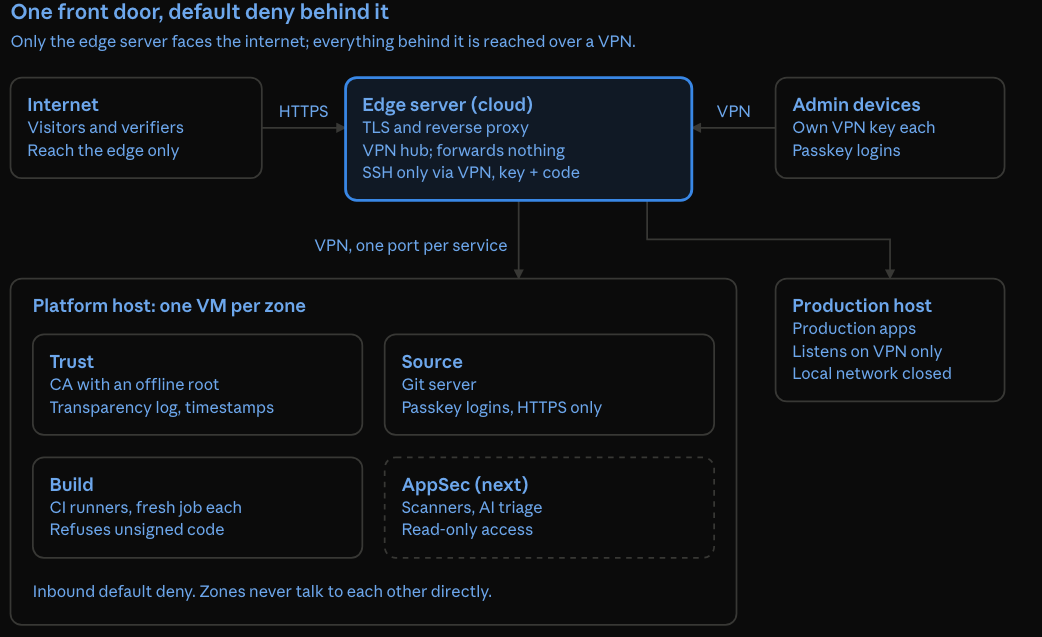
The edge server is the only machine the internet can reach. Admin devices, the platform's zones and production all sit behind it on a VPN, and each zone accepts only its own traffic.
The principles
Six rules shaped every change. They follow zero-trust principles: identity over network location, least privilege, and default deny. None of them is new; applying them consistently is the hard part.
- One public front door. Only the edge server faces the internet. It terminates TLS and forwards each public name to exactly one service. Everything else, including SSH, is reachable only through a VPN.
- Default deny between zones. Each service runs in a VM in its own zone. Inbound, a zone accepts traffic only on its own ports and only from the edge, so zones can't reach each other directly. Outbound traffic is a separate property, and gets its own allowlist in a later part.
- Identity over network location. Being on the VPN gets you to the door, not through it. Every service still requires a passkey-backed login, and signing requires a short-lived certificate tied to that identity.
- Two factors on every admin path. SSH needs a key plus a one-time code. The accounts that sit above every firewall (cloud console, domain registrar, email, password manager) all use passkeys or MFA.
- One source of truth per control. One firewall configuration per machine, no rules hiding in VPN configs or install scripts, and every change tested with a reboot.
- Least privilege for shared machines. A non-admin account on a shared desktop can't reach the platform networks at all.
Five findings
Every one of these was invisible in normal operation. Everything worked; it just wasn't what I thought it was.
1. A VPN install script had opened the edge server to its clients
Found: an old VPN server, installed years ago with a popular install script, had added one firewall rule that accepted everything arriving from VPN clients. Any device with a VPN profile could reach every service on the edge server, not just the ones it needed.
Fix: the VPN was no longer used, so I removed it completely: the package, its service, its firewall rules, its keys and its leftover config files. One VPN remains, with one key per device.
Lesson: install scripts change your firewall, and they don't tell you. Audit what they leave behind, especially rules that trust a whole interface.
sudo iptables -S INPUT | grep -E -- '-i (tun|tap|wg)[0-9]* -j ACCEPT' # any rule trusting a whole VPN interface?2. IP forwarding was off, and switched itself back on at every boot
Found: I turned forwarding off, so the edge server would never route traffic between VPN clients and my local machines. The next boot quietly turned it back on. One line in the VPN tunnel's config did it every time the tunnel started, and three more config files, one of them applied last by the host firewall, said the same. IPv6 forwarding was on too, set by the old VPN install.
Fix: removed the tunnel's startup hooks; set forwarding off for IPv4 and IPv6 in every place that set it; rebooted; checked again.
Lesson: the running state isn't the configured state. A fix you haven't rebooted is a fix you haven't tested.
sysctl net.ipv4.ip_forward net.ipv6.conf.all.forwarding
sudo grep -rn 'forward' /etc/sysctl.conf /etc/sysctl.d/ /etc/ufw/sysctl.conf 2>/dev/null | grep -v ':#'
sudo grep -rniE 'pre(up|down)|post(up|down)' /etc/wireguard/ /etc/openvpn/ /etc/network/ 2>/dev/null   # startup hooks in VPN and network configs
3. SSH accepted passwords, despite a hardening file that said it shouldn't
Found: I added a drop-in file setting PasswordAuthentication no. SSH still accepted passwords. The server's main SSH config was years old and never loaded the drop-in folder at all, so my file was simply ignored. I only noticed because a test login asked for a password.
Fix: added the missing include line; made the main file agree as well; now logins need a key and a one-time code, and only through the VPN.
Lesson: verify the effective configuration, not the file you wrote. SSH will tell you exactly what it's going to do.
sudo sshd -T | grep -E '^(passwordauthentication|kbdinteractiveauthentication|permitrootlogin|authenticationmethods)'4. Container ports bypassed the host firewall
Found: the host firewall denied incoming traffic, yet production web services were reachable from every device on the local network. Docker publishes container ports with its own NAT rules, which take effect before the host firewall ever sees the traffic. 0.0.0.0:80 meant every interface, whatever the firewall said.
Fix: published each service only on the VPN address, the only place the edge server reaches it from; made Docker start after the VPN, so that binding can't fail at boot; then tested from another device on the local network until every attempt timed out.
A bonus finding while fixing it: recreating one container by hand, without the deployment's environment file, made Docker Compose fill the missing passwords with blank strings. A config error stopped it before anything changed. Now every production change goes through the normal deploy settings, behind a check that refuses to run if any variable is unset.
Lesson: bind services to the interface you mean, and test from the outside. Your firewall is not the only thing writing firewall rules. The checks below are a first pass; the real proof is a connection attempt from another machine.
docker ps --format '{{.Names}}  {{.Ports}}' | grep -E '0\.0\.0\.0|\[::\]|:::'      # published on every interface, IPv4 or IPv6?
docker ps -q | xargs -r docker inspect --format '{{.Name}} {{.HostConfig.NetworkMode}}' | grep -w host   # on the host's own network?
5. Resizing a disk renumbered its partitions
Found: I shrank another operating system's partition to give the platform its own disk space. The partitioning tool inserted the new partition by rewriting the partition table, and the Linux root moved from partition 3 to partition 4. The system booted normally, because Linux finds its root by UUID. But "partition 3", the number I had in my notes, was now the new empty space. One step later, I would have wiped the running system.
Fix: checked what each partition actually was (findmnt, lsblk, blkid) before touching anything, and gave the platform's storage its stable partition UUID instead of a number.
Lesson: never act on a number from memory. Verify the target right before any destructive command, and reference things by stable IDs.
findmnt -no SOURCE /                        # which partition is the running system?
lsblk -o NAME,SIZE,FSTYPE,PARTLABEL,MOUNTPOINTS
The pattern behind the five
Each finding is an instance of a broader principle:
Finding | Principle |
|---|---|
A VPN install left a permissive rule | Third-party tooling can silently expand trust |
Forwarding came back after a reboot | Runtime state and persistent configuration diverge |
SSH hardening was ignored | A control only counts if it's actually loaded |
Container ports bypassed the firewall | Validate controls across every enforcement layer |
Partition numbers changed | Memory isn't a reliable resource identifier |
What's next
With the foundation hardened, the next parts of the series build the platform itself:
- The git server, with passkey-only accounts and git over HTTPS using short-lived tokens; no long-lived SSH keys for pushing code.
- My own certificate authority, with the root key created on a machine that has no network at all, and kept offline.
- A private Sigstore stack: short-lived signing certificates, a transparency log, a timestamp authority, and an independent witness that checks the log is never rewritten.
- Keyless commit signing and a CI gate that refuses anything unsigned, plus releases signed by the CI workflow's own identity.
- Supply-chain controls for third-party dependencies: internal dependency proxies, SBOMs, and signed provenance for every build.
- A central, tamper-evident audit log, so each machine's events leave it the moment they happen, out of reach of anyone who later breaks in.
- AI-assisted triage, built on top of all that.
None of the five findings above was exotic. Each was ordinary drift: a script that did more than it said, a config that wasn't loaded, a tool that bypassed another. That's the point. Most real exposure isn't a zero-day; it's the gap between what you configured and what's actually running. Security configuration isn't proof of security; verified behavior is.
If you've hit a finding like these in your own environment, I'd like to hear about it.
Member discussion